Anjely Font Review: A Maker’s Secret for Elegant Designs
I was redesigning the label for a limited batch of soy candles when I first opened the Anjely font file. I needed something that could communicate “luxury” in a very small square space. Something that felt handcrafted and intentional without looking like every other script on the market. The moment I typed the first character and watched those impossibly detailed ornaments bloom around the letterforms, I knew I had found exactly what I was looking for. Anjely brings an authentic, old-world elegance that is remarkably rare in modern font libraries. Whether you are a handmade seller, a printable creator, or an invitation designer, this typeface has a rare ability to make your product look like it belongs in a high-end boutique.
The Visual Personality and Ornamental Charm of Anjely
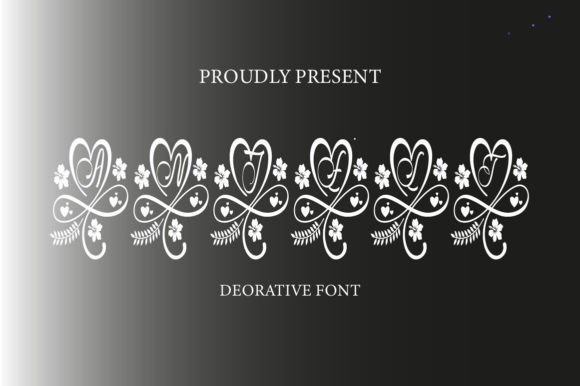
Anjely immediately evokes a sense of timeless sophistication. It draws heavily from classic monogram and copperplate calligraphy traditions, but its construction is deliberate and crisp enough to work seamlessly in modern applications. The “lovely and incredibly detailed ornaments” are the true heart of this typeface. They are not merely an afterthought; they are beautifully integrated into the character set, allowing you to create custom flourishes, borders, and monograms without leaving your design software. The high contrast between the thick downstrokes and fragile hairlines gives it an editorial, fashion-forward feel. As a maker, what I appreciate most is its adaptability. It can feel wonderfully romantic for a wedding invitation, elegantly understated for a skincare label, or boldly regal when used in gold on a dark background.
This font saves immense time during the design process. Instead of building intricate vector ornaments from scratch to frame a name or initial, Anjely provides them directly. It encourages you to design with more flair and confidence, knowing that the decorative elements are already perfectly matched to the letterforms.
Testing Anjely on Real Product Mockups
I put Anjely through a rigorous series of tests based on the types of products I actually create and sell. Here is how it performed across different formats.
Candle Labels and Packaging. I created a 2.5-inch circular label for a vanilla and sandalwood candle. The intricate details held up beautifully on matte adhesive paper. The font anchored the brand name, giving it a distinct premium feel. I paired it with a clean sans serif font for the scent notes and ingredients. The result looked like a luxury department store product. However, at sizes under 1.5 inches, the fine details can begin to blend together, so I recommend reserving it for the main display text or hero element of your packaging.
Wedding and Event Stationery. This is the natural habitat of Anjely. I used it for a “Welcome to Our Wedding” sign mockup. The ornaments acted as stunning corner flourishes that framed the text perfectly. For a full invitation suite, I reserve Anjely for the couple’s names and let a simpler serif font handle the body copy. This creates a beautiful visual hierarchy and ensures the intricate details remain the focal point of the design.
Cricut and Cut File Projects. I tested Anjely for a monogram design on a tote bag. The font weeded surprisingly well. The strokes are clear and the shapes are deliberate, which prevents the vinyl from tearing during the weeding process. The ornaments create a stunning frame around the central letter, resulting in a professional, custom look that sells very well in handmade shops.
Product Tags and Hang Tags. I designed hang tags for a small collection of handmade scarves. When printed on thick, uncoated cardstock, the font added a narrative to the garment. It communicated “artisanal” and “handcrafted” without needing any extra words. It helps build a brand identity that customers recognize and trust.
Readability, Sizing, and Smart Font Pairing for Production
Anjely is a display font and it is crucial to treat it as such. It is not intended for long paragraphs, dense ingredient lists, or technical product instructions. If your design needs to convey mandatory information, pair it with a clean, neutral companion font. This is the secret to professional production.
- Sans Serif Pairing. Montserrat, Lato, or Helvetica Now. The neutrality of a strong sans serif allows Anjely’s decorative nature to be the hero. This combo is perfect for modern packaging, web banners, and social media graphics.
- Serif Pairing. Playfair Display, Cormorant Garamond, or Bodoni. Pairing Anjely with another elegant serif creates a cohesive, editorial, and very high-end feel. This works wonderfully for book covers, editorial design, and premium stationery.
- Handwritten Pairing. For a more casual or boho feel, pairing it with a simple handwritten font can soften the formality while still keeping a curated aesthetic.
Give Anjely room to breathe. Use it large for maximum impact. In product mockups, listing images, and shop banners, it creates an immediate anchor of professionalism. It tells your customer that you care intensely about the details of your craft.
Anjely for Your Digital Brand and Online Presence
Your digital brand assets are just as important as your physical products. I applied Anjely to a mockup of an online shop banner and a promotional social media graphic. The font created an immediate sense of curated quality. In listing images, using Anjely over a softly blurred lifestyle photo elevates the entire composition. It communicates a premium brand identity without requiring expensive photoshoots. For printable creators, this font is pure gold. It allows you to create intricate, ornate digital templates that look custom and detailed. Customers see this value immediately. Its high contrast reads beautifully on screens, making it effective for preview images and digital advertisements.
Critical Checks Before You Start Selling
Before you fall in love with the ornaments and begin production, there are a few practical checks to perform to ensure your projects are legal and technically sound.
- File Formats and Features. Ensure you download the correct format for your workflow. OTF is generally best for Mac, TTF for Windows. Look for the full character map. Fonts like Anjely often hide their best alternate characters, ligatures, and swashes in the Glyphs panel. Taking the time to learn how to access these features will unlock the font’s full potential.
- Commercial Licensing. This is non-negotiable for sellers. If you plan to use the font on physical products such as mugs, shirts, candles, or signage, or on digital products such as printables and templates that you sell, you must purchase the appropriate commercial license. This respects the work of the type designer and protects your business from legal issues.
- Multilingual Support. If you create for a global audience, verify which language characters are included. This ensures your designs are accessible and authentic.
Anjely has quickly earned a permanent spot in my design toolkit. It solves a very real problem for makers: how to achieve a high-end, custom, and intricate look without hours of manual vector work. It is warm, elegant, and incredibly effective when used correctly. If you create wedding invitations, monogrammed products, boutique packaging, or digital printables, this font is absolutely worth the investment. Understand its strengths, pair it wisely, and let its beautiful details speak for themselves. It is the kind of typeface that reminds us why we fell in love with design in the first place.